
Productivity
Check out the innovative technologies of Hyundai that's leading the global construction equipment industry with outstanding technological prowess.
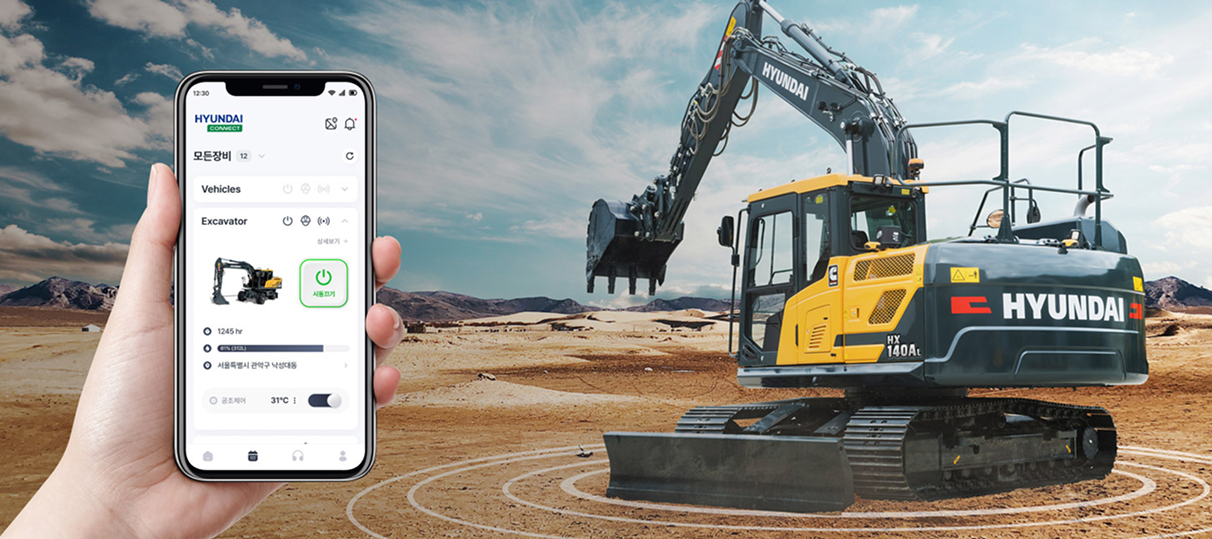
Remote solutions to improve work efficiency
Hyundai Connect Mobile App
Hyundai Connect is a comprehensive construction equipment management app developed by Hyundai enabling the users of its equipment to remotely start their equipment, control the air conditioning system, keep a vehicle management book, submit a request for repair services, check the inventory for parts needed, and more from their smartphones.
Users can also view the specifications of their equipment, equipment management guides, dealer information, and keep a vehicle management book and work log after registering their equipment.
In addition, if the registered equipment is equipped with Hi MATE, it's possible to not only check the operational information and location of the equipment, but also remotely start it and control the air conditioning unit, making it much easier to manage and use the equipment.
Equipment remote control
Operate your equipment remotely with the startup button
Remote startup
Turn your equipment on or off remotely, regardless of how far away you are from it.
Heating and air conditioning system control
Remotely pre-activate the air conditioner in the hot summer and the heater in the cold winter to create a comfortable environment in the cab.

Locating the equipment
Remotely pre-activate the air conditioner in the hot summer and the heater in the cold winter to create a comfortable environment in the cab.
Equipment details
Check the duration of engine operation, driving duration, current location, and other information about your equipment.

Manage operational data
Manage the operation status using weekly, monthly, and yearly calendars.
Vehicle management book & work journal
Record weekly, monthly, and yearly fuel and maintenance costs, as well as the time and location of the work performed in a calendar format.
.pngaa150acd-512d-49fe-9460-f0f252c08af8.png)
After-sales service status
Check the processing status after submitting a repair request
Repair request and status check
In the case of equipment failure within the warranty period, submit a repair request and check the progress in the app.
.pngb34a762b-5692-4bb5-a0f8-de5e5130bab0.png)
Parts information
Select your preferred dealer and view the inventory status for the part you need
Parts information
View prices, availability, and manuals for parts used in your equipment.
Request a quote
Create a list of parts you are interested in and request a quote from your preferred dealer.
.pngcdfe0142-502a-42ea-b73b-533f5b8d6941.png)
Receive the latest news from Hyundai
Brand story about a comfortable tomorrow for everyone
Get the latest news and equipment-related information from Hyundai through the app.
.pngf2ae6e00-bb6a-4eb2-89dd-12c62f7145c5.png)